SpectraDetect Multi-Region Deployment — High Availability and Data Residency
A multi-region deployment distributes Spectra Detect across two or more geographic locations to achieve high availability, disaster recovery, and data residency compliance. Files are analyzed in the region where they are submitted, and a centralized SDM cluster provides unified management across all regions.
Architecture
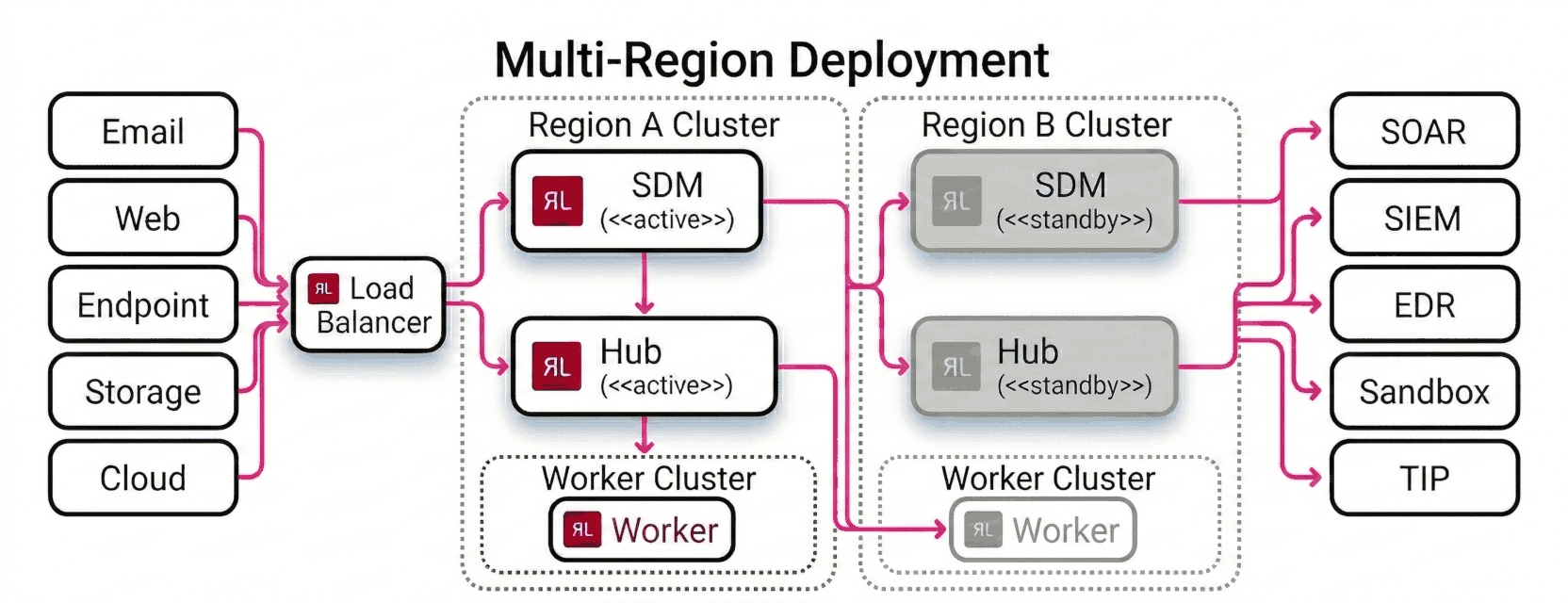
A single load balancer sits in front of both regions and receives all incoming traffic from file sources (email gateways, web proxies, endpoint agents, file storage, and cloud buckets). It routes each request to the active region based on health, geography, or routing policy.
Within each region, an SDM node and a Hub node run as an active/standby pair. Region A runs the active SDM and the active Hub; Region B runs the standby SDM and standby Hub, kept in sync via state replication. Workers run as a cluster in each region and process files submitted by the local Hub. A worker in Region B handles overflow or failover from Region A when needed.
Analysis results flow from the Worker clusters through the Hubs and out to the configured output destinations — SOAR, SIEM, EDR, sandbox, and threat intelligence platforms — regardless of which region performed the analysis.
When to use multi-region deployment
Use a multi-region deployment when you need:
- Data residency — files must be analyzed in a specific jurisdiction and must not leave that region.
- Low latency — file sources in different geographies connect to the nearest Hub rather than routing across continents.
- High availability — a regional outage does not stop file analysis in other regions.
- Disaster recovery — the SDM failover ensures management continuity even if one data center is lost.
Components
| Component | Role in multi-region |
|---|---|
| SDM load balancer | Routes SDM API/UI traffic to the active SDM node; fails over to standby across regions |
| SDM cluster (active + standby) | Central control plane; state-synced between nodes |
| Hub load balancer | Distributes file submission traffic to regional Hub clusters by geography or policy |
| Regional Hub cluster (active + standby) | Ingests files and distributes them to Workers in the same region |
| Regional Worker cluster | Performs file analysis locally; scales independently per region |
Prerequisites
Before deploying across multiple regions:
- An SDM instance must be reachable from all Hub clusters (consider network peering or a transit gateway between regions).
- Each regional Hub and Worker cluster must be deployed and registered with SDM before enabling cross-region routing.
- TLS certificates must cover all regional endpoints, or a wildcard/SAN certificate must be issued for the load balancer and regional hostnames.
Load balancer requirements by platform:
| Platform | SDM load balancer | Hub load balancer |
|---|---|---|
| On-premises data center | Customer-provided hardware or software load balancer (for example, F5 BIG-IP, HAProxy, or NGINX) with health-check and failover support | Customer-provided load balancer with geographic or policy-based routing between data center sites |
| AWS | AWS Global Accelerator or Application Load Balancer (ALB) | AWS Global Accelerator with endpoint groups per region, or Route 53 latency-based or geolocation routing |
| Microsoft Azure | Azure Front Door or Azure Load Balancer with Traffic Manager | Azure Front Door with origin groups per region, or Azure Traffic Manager with geographic routing |
| Google Cloud | Google Cloud Load Balancing (global external HTTP(S) load balancer) | Google Cloud Load Balancing with backend services per region, or Cloud DNS with geolocation routing policies |
Deployment steps
1. Deploy the SDM cluster
Deploy SDM in your primary region following the appropriate deployment guide for your platform (OVA, AMI, or Kubernetes). Configure the standby SDM node in a second region and enable state synchronization between them.
Place a load balancer (or DNS failover) in front of both SDM nodes so that API and UI clients use a single hostname regardless of which node is active.
2. Deploy regional Hub and Worker clusters
For each region:
- Deploy a Hub cluster (active + standby) following the appropriate deployment guide for your platform.
- Deploy a Worker pool in the same region and register it with the local Hub.
- Register the Hub cluster with SDM using the SDM management API or UI.
Repeat for each region. Each region should have its own Hub cluster and Worker pool that operate independently.
3. Configure the Hub load balancer
Configure your global load balancer to route incoming file submission traffic to the correct regional Hub cluster. Common routing strategies:
- Geographic routing — route requests to the nearest region based on the client's location.
- Latency-based routing — route to the region with the lowest measured latency from the client.
- Failover routing — designate a primary region and fail over to a secondary if the primary becomes unhealthy.
4. Verify cross-region operation
After deployment:
- Submit a file from each region and confirm it is analyzed by Workers in the correct regional cluster.
- Check the SDM dashboard and confirm all regional Hubs and Workers appear as connected and healthy.
- Test SDM failover by stopping the active SDM node and confirming the standby takes over without interrupting Hub connectivity.
- Confirm YARA rules deployed through SDM propagate to Workers in all regions.
Considerations
YARA rule synchronization — SDM pushes YARA rule updates to all registered Workers across all regions. Ensure network connectivity between SDM and every regional Worker cluster.
License — each Worker node consumes a license seat regardless of region. Contact your ReversingLabs account team to confirm your license covers the total Worker count across all regions.
Analysis results — by default, each regional Hub stores results locally. Configure S3 output or webhook forwarding if you need results aggregated centrally.
SDM availability — if the SDM cluster is unreachable, Hubs and Workers continue processing files using their last-known configuration. YARA rule updates and license checks are paused until SDM connectivity is restored.