Spectra Analyze MISP Enrichment Module
Version: 1.0.0
Status: Production Ready
Last Updated: January 2026
Introduction
The Spectra Analyze MISP Enrichment Module brings powerful threat intelligence to your MISP instance by enriching indicators of compromise (IOCs) with data from ReversingLabs Spectra Analyze. Security teams can now seamlessly correlate file hashes, domains, IP addresses, and URLs against ReversingLabs' comprehensive threat database directly within MISP.
What This Module Does
When you enrich an IOC in MISP, this module:
- Extracts the indicator (hash, domain, IP, or URL)
- Queries the ReversingLabs API
- Transforms the response into MISP-compatible objects and attributes
- Creates enriched MISP objects with threat classification, risk scores, and related indicators
For best results, ensure the Spectra Analyze integration with Spectra Intelligence is configured. For more information, see Spectra Intelligence Configuration. This integration provides enrichment for IOCs which were not analyzed by the configured Spectra Analyze instance but which are available from Spectra Intelligence.
Key Features
- File Hash Enrichment - MD5, SHA-1, SHA-256 analysis results
- Domain Enrichment - DNS records, threat classifications, associated IPs
- IP Enrichment - Geolocation, associated domains, threat reputation
- URL Enrichment - Domain extraction, content analysis, threat classification
- Automatic Relationship Mapping - Connects file objects to domains, IPs, and reports
- Enterprise Ready - Proxy support, custom SSL certificates, configurable timeouts
- Declarative Mappings - JSON-based configuration for customization
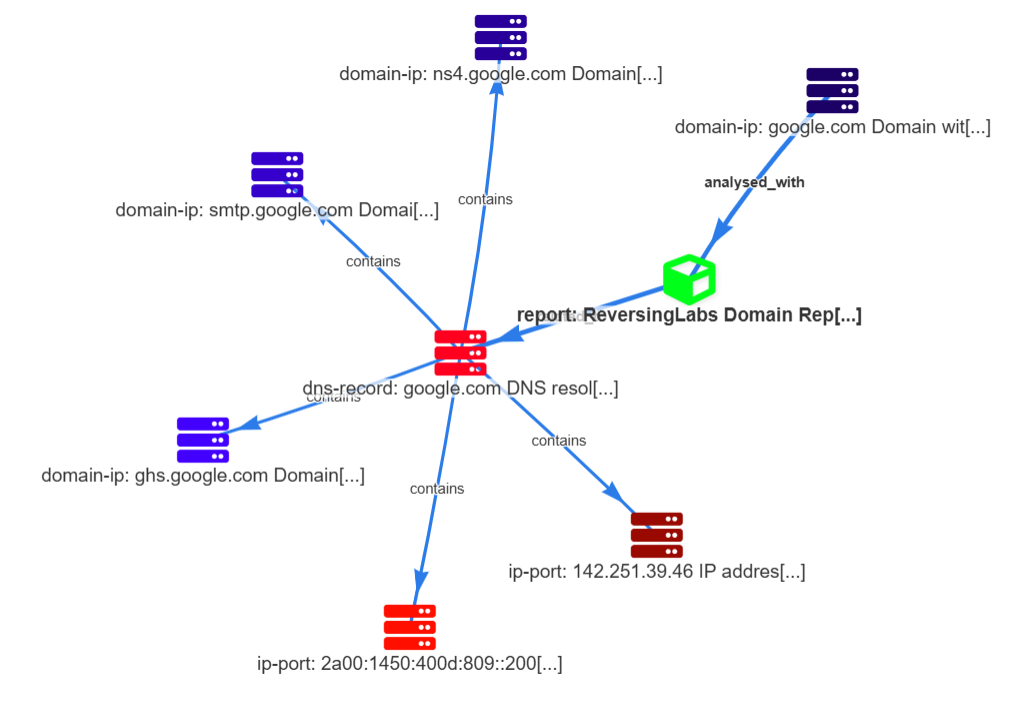
How It Works: Data Flow
When you enrich an indicator in MISP, here's what happens behind the scenes:
- MISP Event Enrichment on IOC attributes (file hash, domain, IP, or URL) via manual or automated workflow
- The Spectra Analyze module sends your indicator to the ReversingLabs API for analysis
- ReversingLabs returns threat intelligence data (classification, risk score, related indicators, etc.)
- The module transforms the response into MISP-compatible objects and relationships
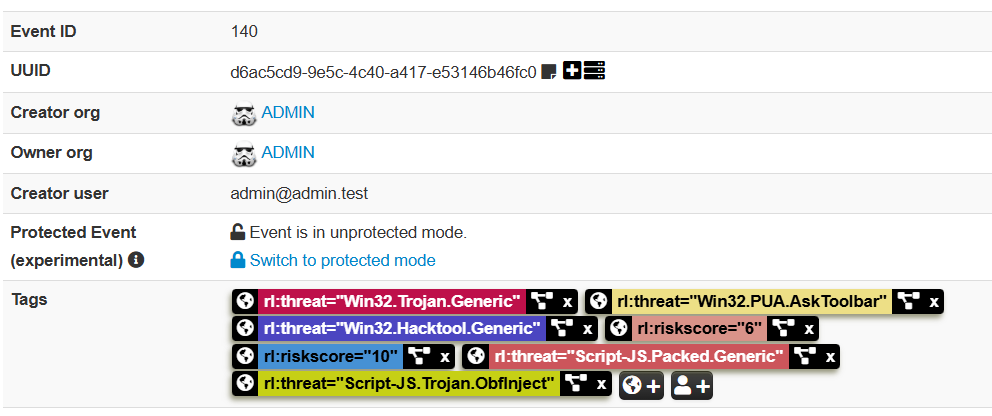
- MISP displays the enriched data directly in your event with tags, attributes, and connected objects
All of this happens within seconds, giving your security team instant threat context without leaving MISP.
Data Flow Diagram

Requirements
MISP Instance
- MISP 2.4.150 or later
- MISP modules service enabled
- Read/Write access to MISP events
ReversingLabs Account
- Spectra Analyze (Standard User Role) and optional Spectra Intelligence
- Spectra Analyze API token, see the following document for generating the required token.
Network
- Outbound HTTPS connectivity to ReversingLabs API endpoint
- Optional: Proxy support for corporate environments
Supported IOC Types
| IOC Type | Supported | Examples |
|---|---|---|
| File Hash | ✓ | MD5, SHA-1, SHA-256 |
| Domain | ✓ | example.com, malicious.net |
| IPv4 Address | ✓ | 192.168.1.1, 8.8.8.8 |
| IPv6 Address | ✓ | ::1, 2001:4860:4860::8888 |
| URL | ✓ | https://example.com/path, http://malicious.com |
Installation & Deployment
Linux (Native MISP Installation)
- Copy the module to your MISP modules directory:
sudo cp reversinglabs_spectra_analyze.py /var/www/MISP/app/files/misp-modules/misp_modules/modules/expansion/
- Set proper permissions:
sudo chown www-data:www-data /var/www/MISP/app/files/misp-modules/misp_modules/modules/expansion/reversinglabs_spectra_analyze.py
sudo chmod 644 /var/www/MISP/app/files/misp-modules/misp_modules/modules/expansion/reversinglabs_spectra_analyze.py
- Restart services:
sudo systemctl restart apache2
# or for php-fpm
sudo systemctl restart php8.1-fpm
Docker (MISP-Docker)
- Find your container name:
docker ps --format '{{.Names}}' | grep misp
- Copy the module into the container:
docker cp reversinglabs_spectra_analyze.py <container_name>:/var/www/MISP/app/files/misp-modules/misp_modules/modules/expansion/
- Set permissions:
docker exec <container_name> chown www-data:www-data /var/www/MISP/app/files/misp-modules/misp_modules/modules/expansion/reversinglabs_spectra_analyze.py
- Restart MISP modules service:
docker exec <container_name> supervisorctl restart misp-modules
Verify Installation
- Go to Administration → List Modules in MISP
- Search for
reversinglabs_spectra_analyze - Confirm the module appears in the list
- Check the module details for any import errors in logs
Configuration
MISP Plugin Settings
After installation, configure the module in the MISP web interface:
- Navigate to Administration → Server Settings & Maintenance
- Click the Plugins tab
- Filter for
reversinglabs_spectra_analyze - Configure the following settings:
| Setting | Description | Example | Required |
|---|---|---|---|
Plugin.Enrichment_reversinglabs_spectra_analyze_enabled | Enable/disable the module | true | Yes |
Plugin.Enrichment_reversinglabs_spectra_analyze_api_url | ReversingLabs API endpoint | https://api.reversinglabs.com | Yes |
Plugin.Enrichment_reversinglabs_spectra_analyze_api_token | Your API authentication token | your-api-token-here | Yes |
Plugin.Enrichment_reversinglabs_spectra_analyze_verify_ssl | Verify SSL certificates | true | No |
Plugin.Enrichment_reversinglabs_spectra_analyze_timeout | API request timeout (seconds) | 30 | No |
To Edit Settings
- Double-click the setting name (left column) to open the input field
- Enter the new value
- Press Enter or click outside the field to save
Enterprise Configuration
Proxy Support
If your MISP instance sits behind a corporate proxy:
Add to local configuration or environment variables:
MISP_MODULE_RL_PROXY_HOST=proxy.company.com
MISP_MODULE_RL_PROXY_PORT=8080
MISP_MODULE_RL_PROXY_USERNAME=domain\username
MISP_MODULE_RL_PROXY_PASSWORD=password
SSL Certificate Verification
For self-signed certificates:
- Set
verify_ssltofalse(not recommended for production) - OR provide the certificate path via
ca_bundlesetting
Some corporate environments with certificate inspection may require disabling SSL verification or providing the corporate root CA certificate.
Docker Environment Variables
For MISP-Docker deployments, add to your docker-compose.yml:
services:
  misp:
    environment:
      - MISP_MODULE_RL_API_URL=https://your-endpoint.com
      - MISP_MODULE_RL_API_TOKEN=your-api-token-here
      - MISP_MODULE_RL_VERIFY_SSL=true
API Coverage & Enrichment Examples
File Hash Enrichment
When you enrich a file hash (MD5, SHA-1, or SHA-256), the module returns:
- Classification - MALICIOUS, SUSPICIOUS, GOODWARE, or UNKNOWN
- Risk Score - 0-10 severity rating
- File Metadata - Type, size, creation date
- Threat Names - Detected malware family names
- Related Indicators - Associated domains, IPs, extracted files
- Analysis Report Link - Direct link to ReversingLabs portal
Example enrichment result:
MISP Object Created: file
├── Attribute: md5 = "5d41402abc4b2a76b9719d911017c592"
├── Attribute: sha256 = "2c26b46911685ce267f59eabc5b40f265256e8a..."
├── Attribute: filename = "malware.exe"
├── Tag: rl:classification = "MALICIOUS"
├── Tag: rl:risk-score = "8"
├── Relationship: analysed-with → report object
└── Relationship: contains → domain-ip objects
Domain Enrichment
Domain enrichment provides:
- DNS Records - A, AAAA, MX, NS, CNAME records
- Associated IPs - Current and historical IP resolutions
- Threat Status - Classification and risk rating
- Whois Information - Registrant details, registration date
Example:
Domain: malicious.net
├── A Records: 93.184.216.34, 93.184.216.35
├── MX Records: mail.malicious.net
├── Associated Threats: Trojan.Generic, Adware.Minor
└── Tags: rl:classification=MALICIOUS, rl:first-seen=2024-01-15
IP Address Enrichment
IP enrichment reveals:
- Geolocation - Country, region, coordinates
- Reverse DNS - Associated domains
- Historical Data - Previous domain resolutions
- Threat Reputation - Known malicious activity
URL Enrichment
URL enrichment extracts:
- Domain & Host - Parsed from the URL
- Threat Classification - URL-level threat status
- Content Analysis - Detected threats in page content
- Redirects - Chained URL relationships
Mapping DSL Primer
The module uses a declarative JSON mapping engine to transform ReversingLabs API responses into MISP objects. Most users don't need to modify mappings, but power users can customize enrichment behavior.
Core Concepts
Handlers are functions that extract and transform data:
| Handler | Purpose | Example |
|---|---|---|
#ref | Extract value from API response using path notation | {{#ref sample_summary.sha256}} |
#summary | Generate human-readable summary for the IOC type | {{#summary}} |
#build_link | Create link to ReversingLabs analysis portal | {{#build_link file}} |
#foreach | Iterate over array and create tags/attributes | {{#foreach top_threats}}...{{/foreach}} |
#iterate_dns | Create MISP objects from DNS records | {{#iterate_dns last_dns_records A,AAAA}} |
Path References
The #ref handler extracts values using dot notation:
{{#ref sample_summary.sha256}}          # Access nested field
{{#ref top_threats[0].threat_name}}     # Array element access
{{#ref classification_reason}}          # Root-level field
{{#ref data_source | 'NOT_FOUND'}}      # Fallback to literal value
Iteration Example
Create multiple tags from threat list:
{
  "rl:threat[]": "{{#foreach top_threats}}{{#ref threat_name}}{{/foreach}}"
}
Results in multiple tags:
rl:threat = "Trojan.Generic"
rl:threat = "Ransomware.Lock"
rl:threat = "Adware.Minor"
Conditional Logic
Use #if directives for conditional enrichment:
{
  "comment": "{{#if classification}}{{#ref classification}}{{#else}}Unknown{{/if}}"
}
Tags and Metadata
Tags are created with namespace prefixes:
{
  "rl:classification": "{{#ref sample_summary.classification}}",
  "rl:risk_score": "{{#ref (int) sample_summary.risk_score}}"
}
Testing & Validation
Quick Test
- Navigate to any MISP event containing a file hash, domain, IP, or URL
- Right-click the attribute and select Enrich
- Choose reversinglabs_spectra_analyze from the module list
- Verify results appear in the event
Expected Output
Successful enrichment creates MISP objects with:
- Standard MISP object structure
- ReversingLabs threat intelligence tags
- Relationship links between related objects
- Direct links to ReversingLabs analysis portal
Troubleshooting
Module Not Listed in MISP
Symptom: Module does not appear in "Enrich" menu or List Modules page
Solutions:
- Verify file location:
/var/www/MISP/app/files/misp-modules/misp_modules/modules/expansion/reversinglabs_spectra_analyze.py - Check file permissions:
ls -l reversinglabs_spectra_analyze.pyshould showwww-dataownership - Restart MISP modules:
sudo systemctl restart misp-modules(Linux) ordocker exec <container> supervisorctl restart misp-modules(Docker) - Check logs:
tail -f /var/www/MISP/app/tmp/logs/error.logfor import errors
"Connection Refused" Error
Symptom: Error when attempting enrichment: "Connection refused" or "Unable to connect to API"
Cause: Wrong API URL or network connectivity issue
Solutions:
- Verify API URL in Plugin settings: Should match your ReversingLabs endpoint
- Test connectivity from MISP server:
curl -I https://your-api-endpoint.com - Check if proxy is needed: If behind corporate proxy, configure
proxy_hostandproxy_port - Verify firewall rules allow outbound HTTPS on port 443
"401 Unauthorized" Error
Symptom: "Unauthorized" or "Invalid API token" error
Cause: Invalid or expired API token
Solutions:
- Regenerate API token in ReversingLabs portal
- Update the token in MISP Plugin settings
- Verify no extra spaces or characters in token (copy-paste errors)
SSL Certificate Errors
Symptom: "SSL certificate verify failed" or "Certificate validation failed"
Cause: Self-signed cert, expired cert, or corporate proxy with certificate inspection
Solutions:
- Set
verify_ssltofalse(not recommended) - Provide corporate CA certificate bundle via environment variable or config
- Contact your IT team for certificate chain
Empty Results from Known Malicious IOCs
Symptom: Enrichment runs successfully but returns no threat data
Causes:
- IOC not in ReversingLabs database (not yet analyzed)
- IOC is legitimate or clean (classification: GOODWARE)
- API quota exhausted
Solutions:
- Try a known malicious hash for testing (for example, from malware samples)
- Check API quota status in ReversingLabs portal
- Review logs for throttling or rate limit errors
Slow Enrichment or Timeouts
Symptom: Enrichment takes >30 seconds or times out
Solutions:
- Increase timeout in settings:
Plugin.Enrichment_reversinglabs_spectra_analyze_timeout(default 30 seconds) - Check network latency:
ping -c 1 your-api-endpoint.com - Check ReversingLabs API status page for service issues
Useful Links
- ReversingLabs Home
- Spectra Analyze Product
- MISP Documentation
- MISP Modules Repository
- This Module on GitHub